How much RAM do I need?
With RAM prices rising currently, sometimes it can feel like they're going up minute by minute. How much RAM should you, as a gamer, have in your system?
So many people will tell you different things. Some say 32GB, some say 16GB, some say 64GB or even more. The reality is that this will depend on what you're using it for, an ‘i’m just looking at websites or doing some shopping’ is massively different to ‘I want to run a local AI model’.
With that in mind, let’s take a look at what a spec for something like an ‘internet browsing’ setup might look like. In this instance let's look at a cheap all-in-one with a decent CPU. For this I would look at LENOVO IdeaCentre AIO 23.8" All-in-One PC - Intel® Core™ i5, this is on sale for around £549 and has only 8GB of RAM. Having used a similarly specced machine like this with my own father it’s a cromulent little machine that will do what we talked about, simple internet browsing. Is it a performance machine? No but it's not meant to be that either.
For things such as video editing, AI workloads, hell even flight sim workloads, the more RAM the better. In the example of Video editing I would recommend 64GB personally because if you're editing long form videos the volume of RAMreally matters. For AI, I mean you could put Terabytes of RAM and it still wouldn't be enough in some instances. Realistically, the bare minimum I recommend is around 96GB to start with, and then carry on adding more as and when you can.
For gaming? Well, this is the hard part. Is 8GB enough? No. But is 96GB right? Again no.
Mostly I think that the starting point would be 16GB. Currently I think 16GB is the right amount to start with. Realistically I would prefer to have 32GB for gaming systems.
The reason I would START with 16GB is because of the price. Let’s look at a 32GB kit with RGB from Corsair. The current pricing I see for a 32GB kit ranges from £510 to £600. The same kits at the 16GB version range from £229 to £399, and this means that you could save that money and put that into another part for your system, more storage, a better monitor, a nicer keyboard. Will the 32GB kit be more ‘future-proof’ than the 16GB kit? Yes but with current pricing I think that the money spent to get the 32GB kit could help flesh out the setup more to start with, and you can still add another 16GB kit later to get you to that golden 32GB number.
Then there is the question, should I get 1 stick of RAM or 2? Now this is where it gets a little weird.
For a regular CPU, always 2. You should always run RAM in dual-channel.
UNLESS you have an X3D CPU from AMD.
AMD have claimed that X3D CPUs are less sensitive to RAM speed and memory configuration, and Micro-Centre followed up AMD’s claims with testing of their own, and the results are, well, surprising.
Their testing was run with a 9850X3D CPU and compared a single stick of 16GB DDR5 against a 32GB kit in dual channel.
Let’s look at the average FPS numbers that they produced.
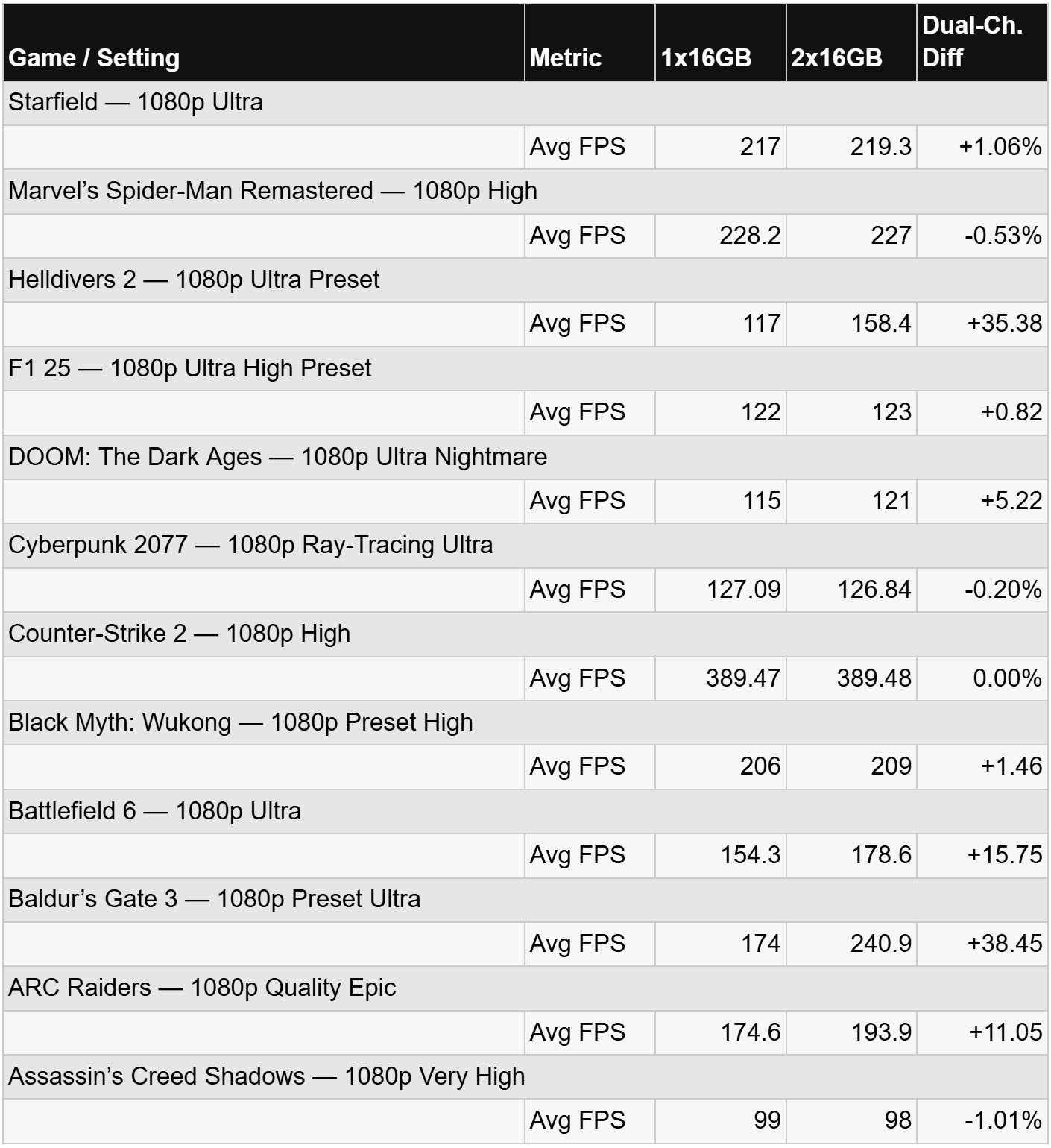
So clearly some games utterly love dual-channel RAM. Or do they? On paper, the answer is of course, but let’s take Baldur's Gate as an example. Yes the jump is massive, but the jump is from 174 FPS! Realistically this level of FPS is already above what most would actually need to run this game. Then we look at Cyberpunk. It just does not care one stick or two, not an issue. So looking at the averages it would appear that one stick on an X3D CPU generally isn't hurting games as much as you'd first think!
BUT as always there is more to this story. Let's take a look at the 1% lows.
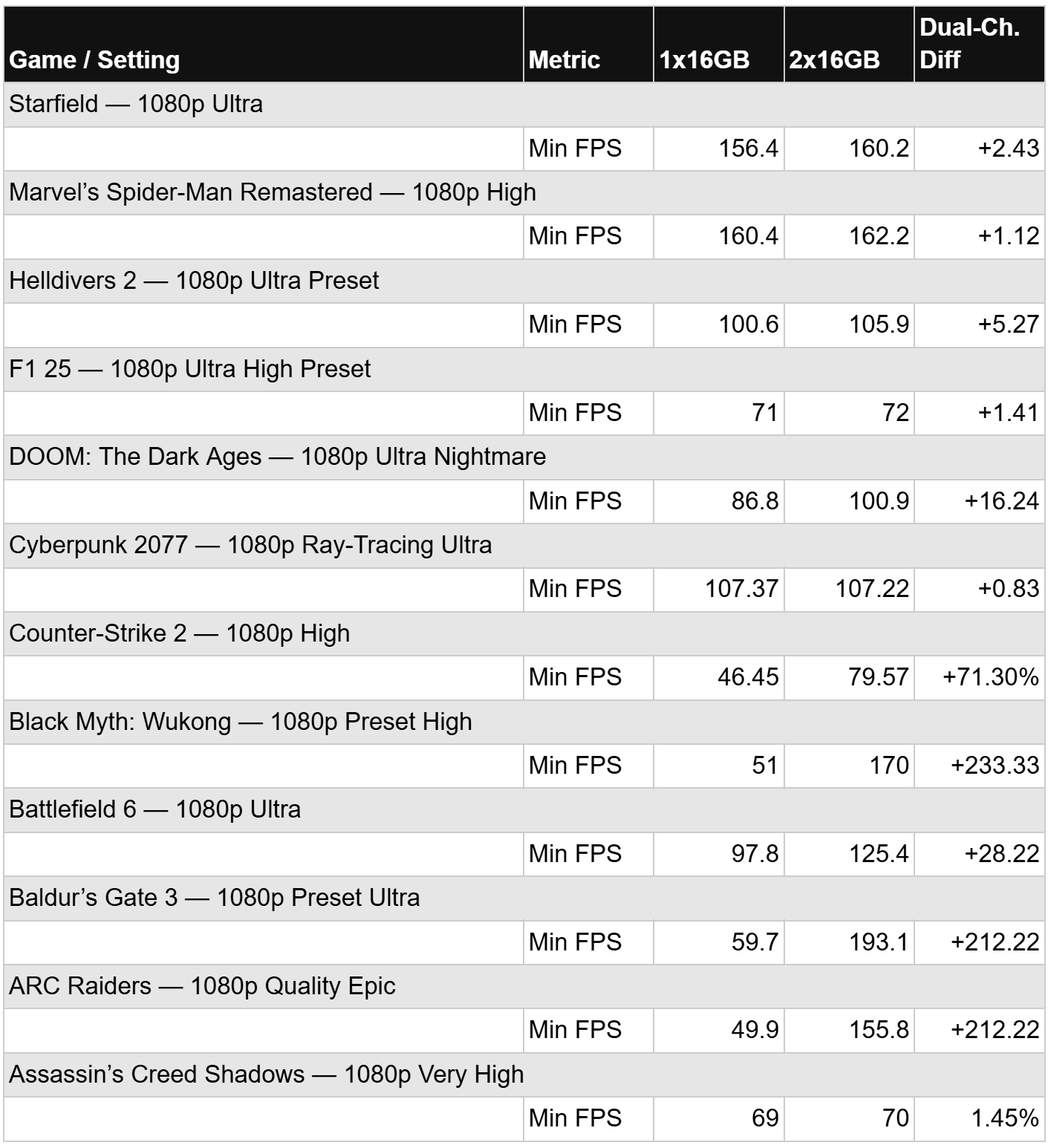
This shows the real benefit of dual-channel RAM: the lows.
Why does that matter? Because averages only tell part of the story. Higher 1% lows generally mean fewer noticeable drops and a smoother, more consistent gaming experience.
However, there is a question to take note of with this data: this is not a like-for-like comparison because the dual-stick kit is 32GB of RAM.
So the question that we would like to see answered is the improvement from the dual channel RAM or the larger volume of RAM? As testing progresses we would like to see this answered.
Is this an issue? For most gamers, no. What this data tells us is that for budget gamers this offers a different path you can take. It will save money up front, but it also provides a clean upgrade path: rather than being stuck with two 8GB sticks that fill your slots.
You can simply add a second 16GB stick later to double your capacity, as ultimately, dual-channel remains the gold standard for enthusiasts.
So should you run a single stick in YOUR system? For a gaming PC, we'd only really consider it on an X3D CPU. It is the X3D cache that allows single-channel RAM to run games at this level.
Non-X3D CPUs will still suffer more with a single stick of RAM; the X3D cache simply lowers that impact in gaming.
We mentioned saving money there and with pricing on RAM seemingly growing daily will this actually help? A SINGLE STICK OF 16GB of DDR5 can be picked up for around £149.99 to £199.99 with no RGB.
That is a considerable saving that can be used towards another part in your system, maybe a larger SSD or a better PSU or a different case that didn't quite fit into the budget because of the RAM. If you want RGB and don't like the idea of having a single stick? That’s OK. Manta XSky have kits that have RGB and then a ‘fake’ lighting module to give the look of dual-channel. Then when you're ready pick up another one and you now have 32GB of RAM.
But what do I do with the two lighting modules now? I can hear you ask. Well, if you have four RAM slots, pop them in there and give the appearance of having four sticks. I use this setup myself, as I like the visual of having all four RAM slots filled! Obviously, this is personal preference, but it gives you the option to do this.
What does all of this really mean for gamers?
You have options, and there are ways to build on a budget that allow you to get almost all of the performance you need from the games you play.
Yet this all depends on your CPU and what games you want to play.
This is why we look at what you play and recommend accordingly.
But HOW MUCH RAM do you need? Again, that comes back to what you need to do with that system, and what games and programs you want to run. There are no hard-and-fast rules, in our opinion, that govern the volume you need.